 Letterlark
Open Outlook and email archive files – without Outlook, without uploading them
Letterlark reads PST, OST, MSG, EML and MBOX files directly in your web browser. It works on Windows, Mac, Linux and Chromebook, and your mail is processed on your own computer – it is never sent to a server.
Open the free viewer See pricing
- Viewing and searching are free, with no limit
- Correct Hebrew, Arabic and other right-to-left text and international character sets
- Export to PDF, EML, MBOX (for Thunderbird or Gmail via IMAP) and CSV
- Works offline once loaded; nothing to install
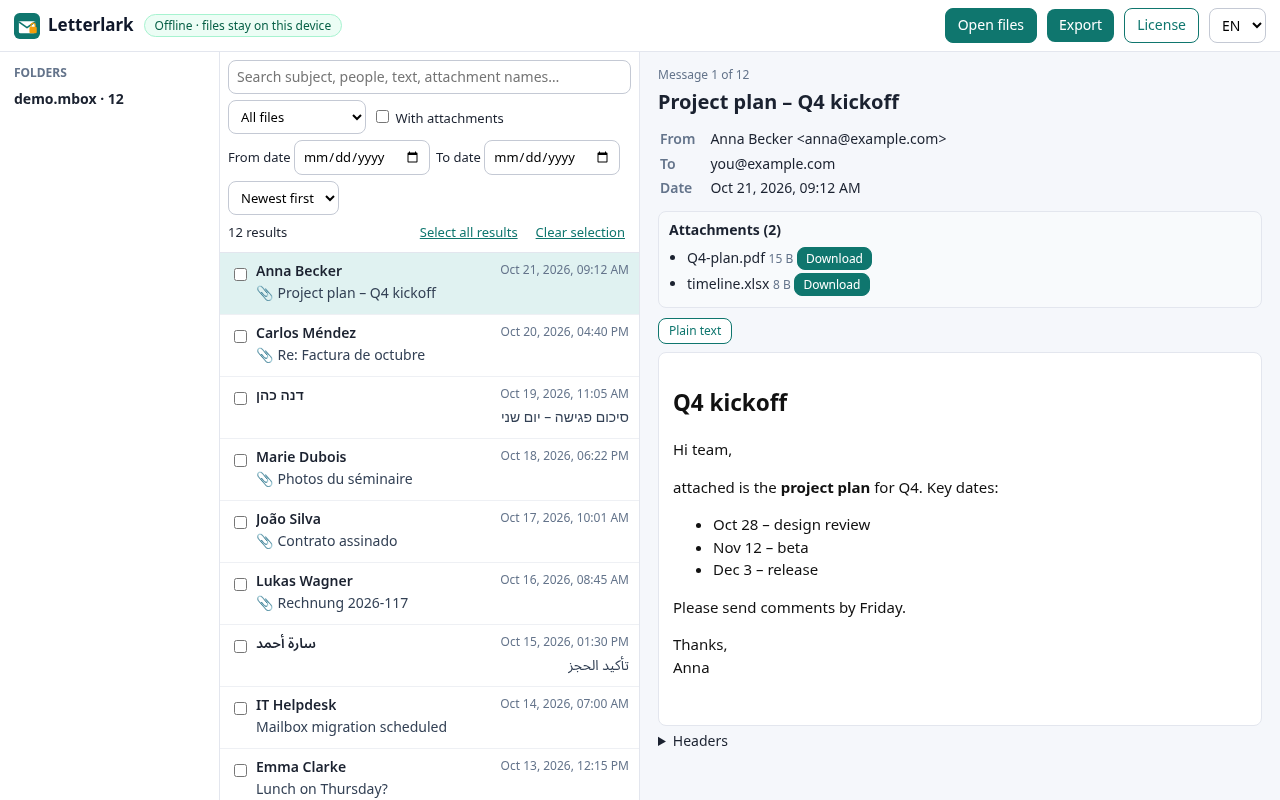
What Letterlark does
All common mail files
Outlook data files (.pst, .ost), single Outlook messages (.msg), standard emails (.eml) and mailbox archives (.mbox) from Thunderbird, Apple Mail, Google Takeout and others.
Search everything
Search subject, sender, recipients, message text and attachment names across all opened files. Filter by folder, date and attachments.
Attachments
Download single attachments, or every attachment of the selected messages as one .zip. Embedded messages (a .msg or .eml inside a message) open with one click.
Export
Save messages as PDF through your browser’s print dialog, as .eml files, as one .mbox file, or as a CSV list for Excel.
Private by design
The app page is locked by a Content Security Policy that blocks network connections, so it cannot upload your files. Remote images in emails are not loaded.
Any language
Hebrew, Arabic, Cyrillic, Greek, Chinese, Japanese and other scripts, including old non-Unicode character sets such as windows-1255, windows-1256, ISO-8859-8 or Shift_JIS.
How it works
- Click Open Letterlark. The viewer loads once and then also works offline.
- Drop your .pst, .ost, .msg, .eml or .mbox files onto the page (or click “Open files”).
- Browse folders, search and read. Select messages and choose an export format if you need copies.
Large PST and MBOX files are read piece by piece from your disk, so they do not need to fit into memory. Opening a multi-gigabyte file still takes a while, because every message is indexed for search.
Guides
Good to know before you start
- Letterlark is a viewer and converter, not a data recovery tool. Damaged or password-encrypted (strong encryption) PST files may not open.
- The free version views and searches without limits; exports are limited to 20 messages at a time. A one-time license removes the export limit.
- Links and remote images inside emails are disabled on purpose, because loading them would contact other servers.
- PDF export uses your browser’s “Save as PDF” printer, so the result can differ slightly between browsers.
Questions and answers
Are my emails uploaded anywhere?
No. Files are opened with your browser’s file API and processed inside the page. The app’s security policy (connect-src 'none') blocks it from making network requests, and you can check this in your browser’s developer tools (Network tab).
Do I need Outlook?
No. Letterlark reads the file formats itself. It runs in current versions of Chrome, Edge, Firefox and Safari.
Can I import the result into Gmail?
Gmail has no file import for PST or MBOX. The usual route is: export to MBOX in Letterlark, import the MBOX into Thunderbird, then copy the messages into your Gmail account connected by IMAP. See import-pst-to-gmail/.
How big can files be?
PST, OST and MBOX files are read in chunks, so multi-gigabyte files can be opened; speed depends on your computer. Single MSG and EML files are loaded whole.
What does the license cost?
Personal $19 or Pro $49, paid once (USDT TRC20 or PayPal). See pricing.